stock here: This is not suitable for the squeamish
https://www.justice.gov/epstein/files/DataSet%2012/EFTA02731341.pdf
These are mostly written in code, but simple enough to break, as this lady has done.
https://jessicar.substack.com/p/i-havent-had-my-stomach-turn-this
So apparently they were actual pedophiles….raping 12 YO girls
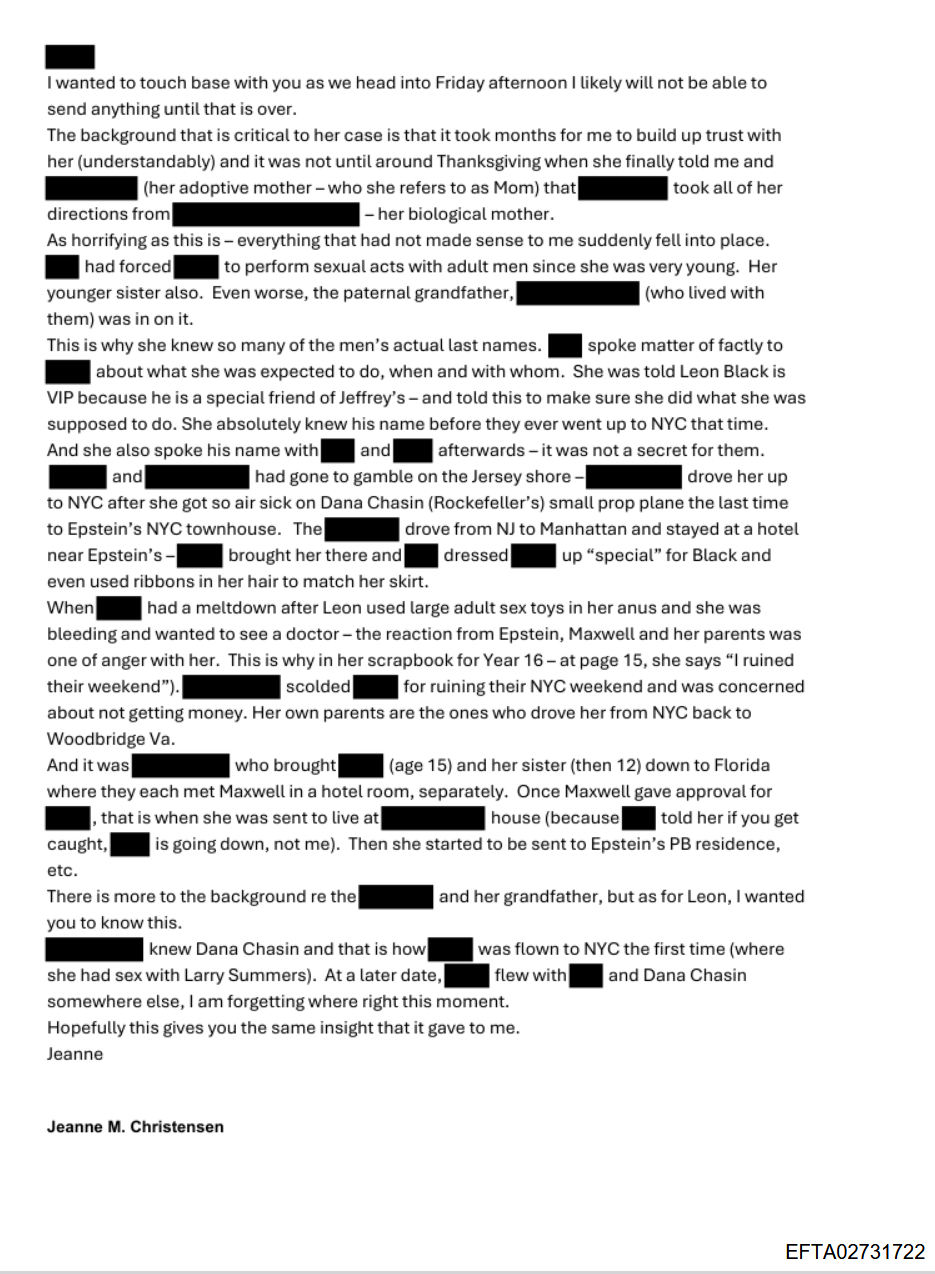
I am downloading 76G from this site, using the ZIP
https://archive.org/details/data-set-10
Some of these methods are helpful, some are dead ends…..from ChatGPT
How to actually access other DOJ Epstein files
Here are reliable ways to navigate the repository:
✅ 1. Go to the root DOJ directory
Instead of using the extension URL, open the actual DOJ page in your browser:
https://www.justice.gov/epstein/files/DataSet%2012/
You can browse the directory listings directly if they’re enabled by the server.
If that directory browsing doesn’t work (because DOJ sometimes doesn’t list directories), then:
✅ 2. Use Google to find the dataset index
Search for:
Justice.gov Epstein “DataSet 12”
or
site:justice.gov/epstein/files “DataSet 12”
That will show a list of the files DOJ has published.
✅ 3. Use a PDF list index (if available)
Sometimes DOJ publishes an index PDF listing all the files in a dataset. Search for something like:
justice.gov epstein DataSet 12 index
or
EFTA027
Since files often follow a pattern like EFTA02731341.pdf, the index can tell you which files exist.
✅ 4. Use the Wayback Machine
If DOJ’s current directory isn’t navigable, archived versions sometimes have directory listings.
Go to:
https://web.archive.org/web/https://www.justice.gov/epstein/files/DataSet%2012/
and browse from there.
If you have a direct “dataset” page
DOJ usually hosts Epstein files in structured datasets like:
- DataSet 1
- DataSet 2
- …
- DataSet 12
Each can be browsed if DOJ hasn’t disabled directory indexing.
Try replacing DataSet 12 with other numbers:
https://www.justice.gov/epstein/files/DataSet%2011/
…and so on.
Summary
| Method | Works? | Notes |
|---|---|---|
Editing chrome-extension://… URL | ❌ | Only local extension cache |
| Navigate to actual DOJ directory URL | ✅ (if enabled) | Best first step |
Google with site:justice.gov/epstein/files | ✅ | Often shows all public files |
| Wayback Machine archive | ✅ | Good fallback |
| Find an index PDF | ✅ | Shows all filenames |
2 replies on “OK Here Are Some of the Epstein Files on the DOJ”
Epstein prison guard googled him minutes before body found — and made mysterious deposit before pedophile’s suicide: DOJ
https://nypost.com/2026/03/07/us-news/prison-guard-googled-jeffrey-epstein-minutes-before-his-body-was-found-and-deposited-thousands-days-before-pedophiles-suicide-doj/
a little musical review –
https://www.youtube.com/watch?v=jV9mEkvJAbE