stock here: h/t Kanekoa, I haven’t tried most of this yet, it looks promising from a “what did society seem like at the time”…..
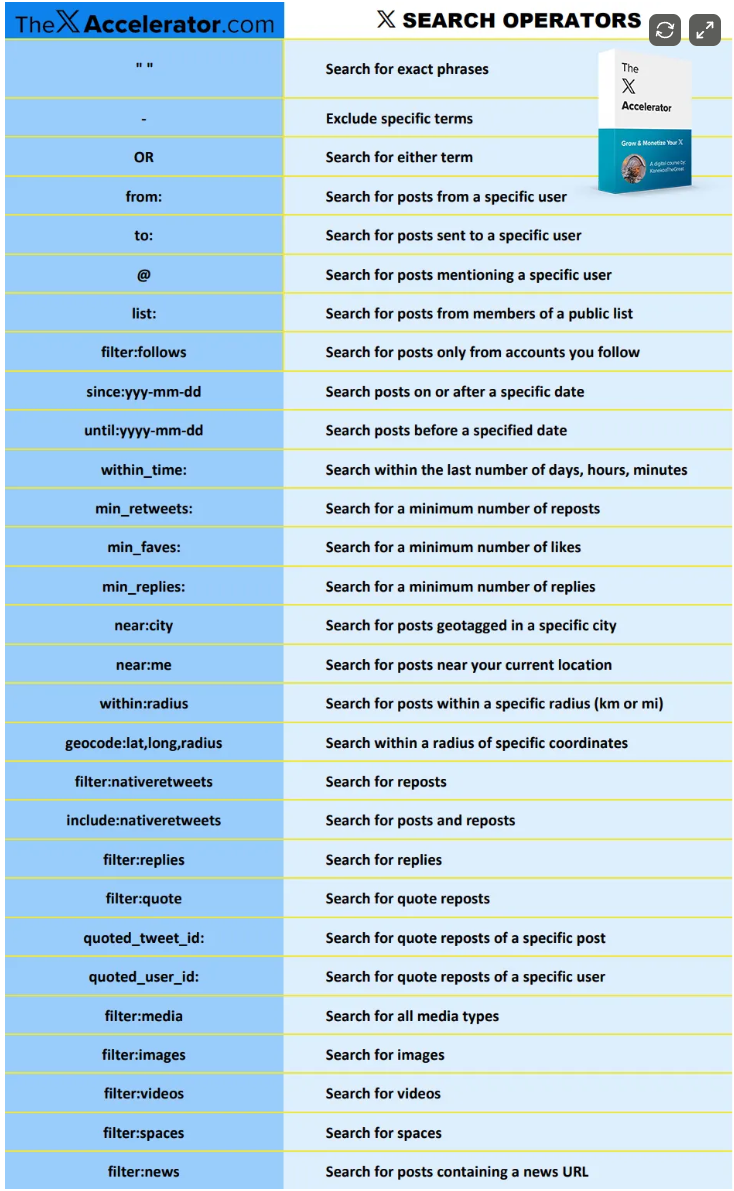
How to Find Anything on 𝕏: The Ultimate Guide to Search Operators
Unlock powerful strategies top creators use to research trends, go viral, and build massive audiences on X (formerly Twitter).
Apr 25, 2025

Ever feel overwhelmed trying to find specific posts on X (formerly Twitter)?
Whether you’re researching trends, tracking conversations, or analyzing viral content—𝕏 can feel like a noisy firehose of information. But there’s a better way to cut through the clutter.
It’s called advanced search operators—and once you master them, you’ll never scroll aimlessly again.
This guide breaks down how to use X’s hidden search tools to find exactly what you’re looking for—whether it’s content from specific users, viral posts in a time window, or geo-tagged reactions to major events.
Let’s start with the basics and build from there.
🔍 Basic Search Operators
These are your foundation for crafting precise searches:
- “Exact Match”: Use quotes to find exact phrases. Example:
"SpaceX Starship" - -Exclude: Add a minus sign to remove results. Example:
Apple -iPhone - OR: Use caps to find either keyword. Example:
cats OR dogs - from:: Search posts from a specific user. Example:
from:elonmusk - to:: Find replies directed to a user. Example:
to:elonmusk - @username: Find mentions of a user. Example:
@elonmusk - list:: View posts from a public list. Example:
list:1733575944588427774 - filter:follows:: Filter results to accounts you follow only.
⏱️ Time Operators
Perfect for tracking conversations and trends over specific timeframes:
- since:: Start date filter. Example:
since:2023-01-01 - until:: End date filter. Example:
until:2023-12-31 - within_time:: Real-time range. Example:
within_time:5h,within_time:2d
Use since and until together to define a custom time window.
📈 Engagement Operators
Use these to study what performs well and why:
- min_retweets:: Minimum reposts. Example:
min_retweets:1000 - min_faves:: Minimum likes. Example:
min_faves:5000 - min_replies:: Minimum replies. Example:
min_replies:200
Want to study what makes posts go viral? Use these filters on your favorite accounts or topics.
🌍 Geo Operators
Need to localize your research? Use these:
- near:: Posts from a specific city. Example:
near:san-francisco - near:me:: Real-time posts near your current location.
- within:: Set a radius. Example:
near:san-francisco within:10km - geocode:: Pinpoint by latitude/longitude. Example:
geocode:37.7749,-122.4194,5km
Perfect for tracking real-world events and regional sentiment.
💬 Post-Type Operators
Filter by interaction type to isolate conversations:
- filter:replies:: Only show replies.
- filter:native_retweets:: Only reposts.
- filter:quote:: Only quote posts.
- quoted_tweet_id:: Find all quote posts of a specific tweet.
- quoted_user_id:: Find all quote posts of a specific user.
Use these to monitor how messages spread and who’s engaging.
🎥 Media Operators
- filter:media:: Find any type of media.
- filter:images:: Only image posts.
- filter:videos:: Only videos.
- filter:spaces:: Find X Spaces (live audio).
- filter:news:: Find posts linking to news articles.
Track what’s trending in formats your audience loves.
🧠 Real-World Examples
- Find my top-performing posts:
from:yourhandle min_faves:10000 since:2023-01-01 until:2023-12-31 - Track content during the Super Bowl:
geocode:36.090556,-115.1838893,3km since:2024-02-11 until:2024-02-12 - Study global news trends:
list:1733575944588427774 filter:news min_faves:300 within_time:24h - Watch the U.S. Capitol on January 6:geocode:38.889787,-77.009006,5km since:2021-01-05 until:2021-01-07
- Monitor Minneapolis during the George Floyd Riots:geocode:44.948360,-93.238152,50km since:2020-05-26 until:2020-05-30 min_faves:5